
Odoo runs the accounting, stock, sales and customer data of more than ten million people. That makes it a target, and it's built with that in mind. Out of the box, Odoo resists the two attacks that hit web applications most often. The question for your business isn't whether Odoo can be secure. It's whether your Odoo is, and that comes down to two things you control: staying patched, and the code you add on top.
This article explains both in plain terms, shows how Odoo protects you by default, and gives you a short list to check against your own setup. It doesn't cover any single vulnerability. It's about the habits that keep an Odoo system safe over the years.
Odoo's core is built to resist the common attacks
Two kinds of attack cause most of the damage on business web applications. One is cross-site scripting, or XSS, where an attacker slips a piece of script into data that your staff or customers later view, so it runs in their browser. The other is SQL injection, where an attacker bends an input field into a database command and reads or changes data they shouldn't.
Odoo is designed so that neither works against its own code. When Odoo shows text on a page, it treats that text as text, even when the text looks like code. Here's a contact whose name is a script. Odoo displays it as plain characters and runs nothing.

The database side works the same way. Odoo talks to its database through a layer that keeps the values a user types separate from the commands it runs, so an entry in a search box stays an entry and never becomes a command. You get this protection without doing anything, on every version of Odoo.
So where is the risk?
In two places that core Odoo can't decide for you: whether you've applied the latest security updates, and what the custom code added to your system does.
1. Staying patched, and who's responsible
Odoo's security team finds and fixes issues and releases updates for them. Whether those updates reach your system depends entirely on where your Odoo runs.


On Odoo Online, Odoo applies security updates for you, and you don't have to think about it. On Odoo.sh, the fixes are ready and you move your project to the latest revision. On your own server, the work is yours. That's the trade-off of self-hosting: full control, and full responsibility for keeping up. Most of the systems that fall behind are self-hosted ones where updates slipped down the list. Automated tools, more and more of them AI-driven, scan the internet around the clock for systems running old versions, so a setup that's months behind is found quickly.
2. The code you add on top
Almost every real Odoo runs custom modules: a report, an integration, a field, a portal tweak. Custom code sits inside Odoo but isn't held to Odoo's protections unless it's written to be. The same two attacks become possible when a module does the one thing Odoo's core avoids.
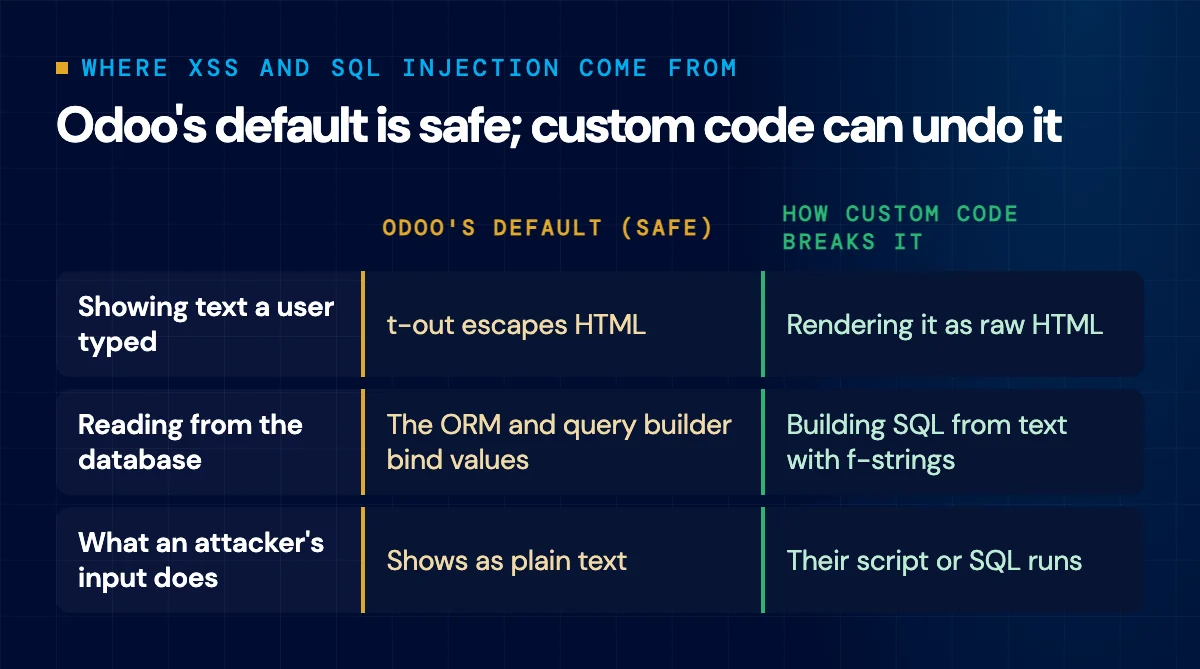

For display, Odoo escapes text by default. A module that instead renders a stored value as raw HTML will run whatever script that value contains, the next time any user opens that screen. For the database, a module that builds a query by pasting a user's input into it, rather than passing the input separately, turns that field into a way to reach the whole database. Neither is exotic. Both are a single careless line, and both are exactly what an attacker looks for.
Why AI-written code makes this sharper
More teams now build Odoo modules and other software with AI assistants. The code usually runs, which is the problem: it looks finished and gets shipped. AI assistants happily produce a report that renders raw HTML or a query built from text, because those versions are shorter and still work in a demo. They pass review when nobody reviews for security. Our article on the security risks of AI-generated code goes through what to check in code an AI wrote, in Odoo or any other framework.
What to do


- Know your version and keep it patched. Find your Odoo version first. If you're self-hosted and behind, plan an update. If you're on Odoo Online or Odoo.sh, this is already handled, with one revision step on Odoo.sh.
- Give each user only the access they need. Many attacks need an account with wide access to do damage. Fewer admins and tighter access rights mean a taken-over or careless account reaches less.
- Review every custom and AI-written module for how it shows user input and how it queries the database, before it goes live. This is the single highest-value check for most businesses.
- Test updates on a copy of your database first, so a security update never brings a surprise to your live system.
- Keep backups and watch your logs, so you can see unusual activity and recover quickly if something goes wrong.
How NavyBits can help
NavyBits has been an official Odoo partner since 2017, with 10 Odoo-certified experts, and a senior engineer leads every project. We do two things that matter here. Our AI code assessment reviews custom and AI-written code, Odoo modules included, for exactly these weaknesses: how it handles user input, how it queries data, and whether it's ready for production. We document each finding with the evidence to back it. And through Odoo support and maintenance we keep systems on a supported, patched version, test updates on a copy first, and watch over them, also for systems other teams built.
Book a free 30-minute call with a business consultant and an engineer. Tell us where your Odoo runs and what's been customised, and we'll tell you where to look first.
FAQ
Is Odoo secure?
Odoo's core is built to resist the common web attacks, such as cross-site scripting and SQL injection, and does so by default on every version. Your real risk comes from running an old, unpatched version or from custom code that doesn't follow the same care, not from Odoo's own code.
Who installs security updates on Odoo?
On Odoo Online, Odoo does it automatically. On Odoo.sh, Odoo provides the fix and you move your project to the latest revision. On your own server, you apply the updates yourself, which is why self-hosted systems are the ones that most often fall behind.
Is self-hosted Odoo less secure than Odoo Online?
Not by design. Self-hosting gives you full control, and with it the job of applying security updates, securing the server and watching the logs. Done well it's secure. The risk is that the update work slips and the system falls behind.
Can a custom Odoo module introduce a security hole?
Yes, and it's the most common way. Odoo protects you by default, but a module that renders user input as raw HTML or builds a database query from text can open cross-site scripting or SQL injection. Every custom and AI-written module should be reviewed for this before it goes live.
How do I check my Odoo version?
Your version decides whether a given security update applies to you. You can see it from the user menu in Odoo, or your partner can confirm it along with whether you're on a supported release. If you're several versions behind, that's the first thing to plan.
Does using AI to write Odoo code make it less secure?
It can, if nobody reviews the result for security. AI assistants often produce code that works but takes the shortcut Odoo's core avoids, such as rendering raw HTML or building queries from text. Review AI-written code the same way you'd review a new developer's, with security in mind.